Know Your Exposure: Why Cloud Permissions, Code Scanning, and Deployment Validation All Matter for React and Next.js Apps



Modern application teams rarely deploy to a single, predictable runtime environment. Frameworks like React and Next.js, combined with the proliferation of SaaS hosting platforms and cloud-managed services, have made it incredibly easy to stand up Single Page Applications (SPAs) in minutes. Unfortunately, this ease of deployment introduces a less obvious risk: organizations often lose track of where their applications actually run.
Security tooling cannot protect what it cannot see. And in the context of recent issues like React2Shell (CVE-2025-55182, CVE-2025-55183, CVE-2025-55184, and CVE-2025-67779), blind spots in environment visibility materially expand exposure. In practice, this means organizations may unknowingly continue serving vulnerable applications to the internet even after remediation appears complete.
Recent React and Next.js vulnerabilities, including the React2Shell family of CVEs, highlighted a broader issue many organizations face. When those environments are not fully enumerated, teams may believe vulnerabilities are fixed while exposed applications continue running in production.
This article explains why these gaps occur, how they can lead to silent vulnerabilities in production, and what teams must do to ensure both code-level and runtime-level security assurance.
The Visibility Problem: Managed Hosting Often Sits Outside Traditional Security Perimeters
Security vendors and inventorying tools rely on cloud-provider Identity and Access Management (IAM) permissions to discover resources running inside an environment. These permissions are typically well understood for core services such as EC2, S3, or container platforms. But managed hosting services for SPAs (such as AWS Amplify, Google Cloud Run) are often not included in default scanning policies.
A concrete example appears in the AWS managed policy SecurityAudit. As shown below, the policy grants read-only access to a wide collection of AWS services but does not include any permissions for AWS Amplify. While AWS Amplify is used here as a concrete example, similar visibility gaps can exist across many managed and SaaS-hosted deployment platforms.
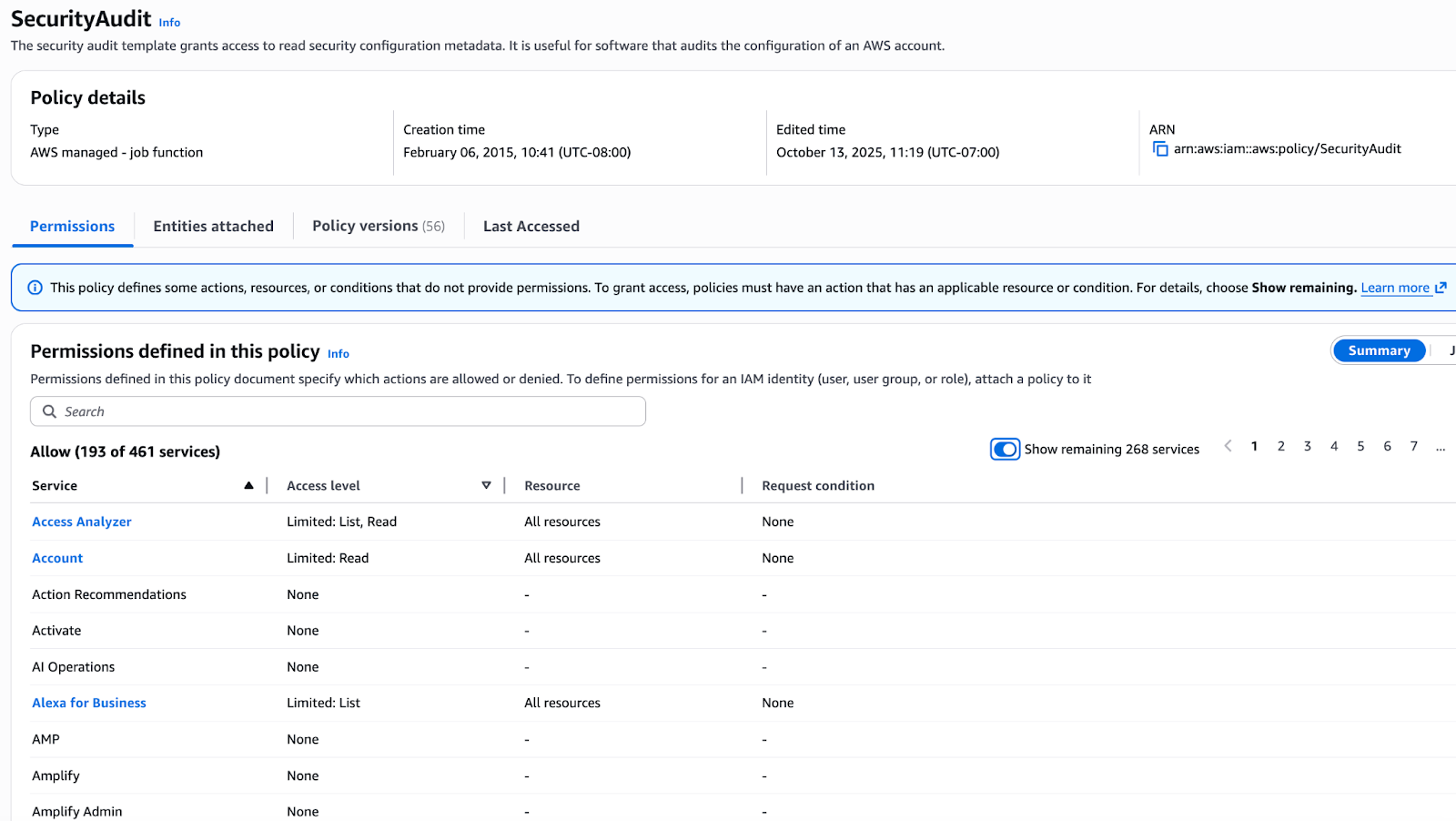
This means:
- Your security tools may be fully capable of detecting vulnerabilities
- Your organization may believe it has complete enumeration coverage
- Yet entire applications hosted in Amplify may not be visible to those tools at all
When a vulnerability affects frameworks commonly deployed through these platforms (as in the case of React2Shell) this lack of visibility becomes operationally significant.
Identifying Vulnerable Next.js Builds in AWS Amplify
If your organization uses AWS Amplify, a vulnerable Next.js deployment may go unnoticed unless runtime configurations are explicitly reviewed. As shown below, you can identify Next.js-based builds by inspecting the buildSpec defined in the Amplify app configuration. A .next directory under artifacts.baseDirectory is a strong indicator.
% aws amplify list-apps
{
    "apps": [
        {
            "appId": ".....”,
            "appArn": "......",
            "name": ".....",
            "repository": "....",
            "platform": "WEB_COMPUTE",
            "createTime": "2025-09-22T11:01:13.861000-07:00",
            "updateTime": "2025-09-22T11:01:13.861000-07:00",
            "iamServiceRoleArn": "arn:aws:iam::....",
            "defaultDomain": "....",
            "enableBranchAutoBuild": true,
            "enableBranchAutoDeletion": false,
            "enableBasicAuth": false,
            "customRules": [
                {
                    "source": "/<*>",
                    "target": "/index.html",
                    "status": "404-200"
                }
            ],
            "buildSpec": "version: 1\nfrontend:\n  phases:\n    preBuild:\n      commands:\n        - yarn install\n    build:\n      commands:\n        - yarn run build\n  artifacts:\n    baseDirectory: .next\n    files:\n      - '**/*'\n  cache:\n    paths:\n      - node_modules/**/*\n",
            "customHeaders": "",
            "enableAutoBranchCreation": false,
            "repositoryCloneMethod": "TOKEN",
            "cacheConfig": {
                "type": "AMPLIFY_MANAGED_NO_COOKIES"
            },
            "webhookCreateTime": "2025-09-22T11:01:13.655000-07:00",
            "jobConfig": {
                "buildComputeType": "STANDARD_8GB"
            }
        },
Once such applications are identified, teams should:
- Review build logs for the exact Next.js version compiled into the artifact as shown below:

- Confirm whether that version aligns with published vulnerability disclosures.
- Apply and redeploy fixes following vendor guidance if needed.
None of these steps happen automatically if your environment enumeration is incomplete.
The Hidden Trap: Code Scanning Does Not Guarantee Runtime Safety
Most engineering organizations rely on code scanning tools (GitHub Dependabot, Snyk, and others) to identify vulnerable dependencies. These tools are essential, and in the case of React-related CVEs, they typically surface risk promptly. Shown below is an example of Dependabot flagging such vulnerabilities.
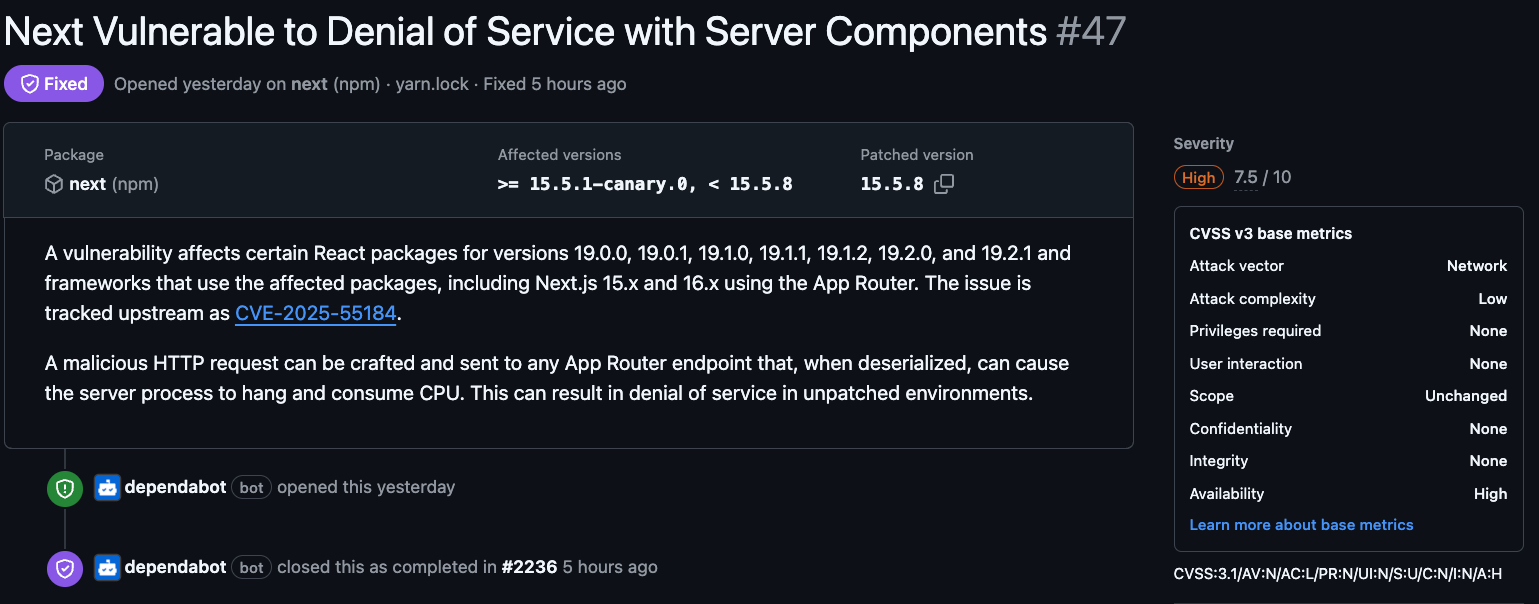
However, two often-overlooked realities create a dangerous false sense of security:
1. Code Scanners Only Analyze Repositories They Can Access
If a deployment platform (e.g., AWS Amplify) sits outside the scope of your IAM permissions, you may fix code in the repository but still have a vulnerable version running in production, completely undetected.
2. Deployment of the Fix May Silently Fail
Even when code scanning tools show all green, CI/CD pipelines may fail to build or deploy updated packages. Without explicit validation of deployment logs and runtime versions, teams may assume remediation is complete when, in fact, the vulnerable code remains active.
In other words: a passing code scan does not mean your environment is safe.
Strengthening Your Security Posture: What Teams Should Do Now
To ensure that vulnerabilities are both detected and remediated effectively, organizations should implement the following measures:
1. Expand IAM Permissions Used by Inventory and Security Tools
Review and update cloud audit roles to include managed hosting services. This closes enumeration gaps and ensures your tools can see all deployed assets.
2. Include SaaS and Managed-Hosting Reviews in Asset Discovery
Your inventory should account for Vercel, Amplify, Netlify, Cloud Run, and similar services. If the platform can serve production traffic, it must be included in your security perimeter.
3. Validate Runtime Versions After Each Remediation
Review build logs, artifact directories, deployed versions, and hosting configuration. Confirm the patched code actually reached production.
4. Add CI/CD Failure Monitoring
Any failed deployment of a security fix should generate an immediate alert, not remain hidden in log output.
5. Combine Code Scanning with Runtime Verification
Neither approach alone is sufficient. Together, they provide authoritative assurance that vulnerabilities are fixed in both the repository and the running environment.
Closing these gaps requires not just better scanning, but continuous validation that remediation actions actually change what is running in production.
Key Takeaways
- Code scanning alone does not guarantee vulnerabilities are removed from production.
- Managed hosting platforms can sit outside default cloud inventory permissions.
- Runtime validation is required to confirm that remediation actions were successfully deployed.
- Visibility gaps increase exposure windows during high-impact vulnerability events.
Conclusion
Modern SPA deployments make it easy for organizations to unknowingly host applications in places their security tools cannot observe. Combined with an overreliance on code scanning and insufficient deployment validation, this leads to a silent but serious risk: extended exposure windows where vulnerabilities appear resolved but remain active in production.
By expanding visibility, validating runtime state, and ensuring deployment success, organizations can materially reduce exposure and prevent blind spots from becoming security incidents.
Featured Blog Posts
Explore our latest blog posts on cybersecurity vulnerabilities.


Ready to Reduce Cloud Security Noise and Act Faster?
Discover the power of Averlon’s AI-driven insights. Identify and prioritize real threats faster and drive a swift, targeted response to regain control of your cloud. Shrink the time to resolution for critical risk by up to 90%.